I am currently using a SQL connector to log events that occur within an app as well as when a machine attribute changes to a SQL table and then query this data and show it to a user within the app via an interactive table. The issue that I am having is that the Tulip datetime datatype assumes all data coming from a SQL data source is stored in UTC time and does not conform to ISO 8601 standards when looking at columns formatted as datetimeoffset datatypes. When querying columns of types datetimeoffset, the offset that is included in the SQL table is ignored and the datetime is implicitly converted to the workspace time zone even when the datetime offset within the SQL table is already stated.
Has anyone found a way to solve this issue or is this a known issue and when using datetimes in SQL connectors we must always use UTC time in SQL when interacting with Tulip?
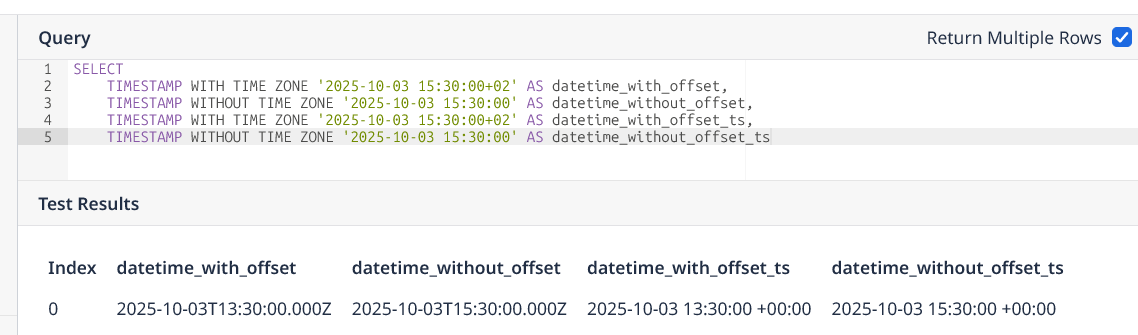
However, I assume you are working with a SQL Server connection? Could you try pasting the equivalent query and sharing your results. You will need to configure the outputs as shown above.
SELECT
CAST(‘2025-10-03T15:30:00+02:00’ AS datetimeoffset) AS datetime_with_offset,
CAST(‘2025-10-03T15:30:00’ AS datetime) AS datetime_without_offset,
CAST(‘2025-10-03T15:30:00+02:00’ AS datetimeoffset) AS datetime_with_offset_ts,
CAST(‘2025-10-03T15:30:00’ AS datetime) AS datetime_without_offset_ts;
When I used the SQL script that you provided it works as intended. The issue is when the datetime is inserted into a SQL table and then subsequently selected from the table. Here is a test that I was running to show this.
It was 8:22 AM Central Time when this test was run and you can see that the Timestamp column in the SQL Server Management screen shot shows that the column is formatted to a Datetimeoffset datatype and when it is returned to Tulip the offset of -05:00 to indicate that the time is already in CST and does not need to be converted to the Workspace timezone setting which is also set to CST.
Ok. Unfortunately, I don’t have access to a cloud SQL Server right now to do more investigating.
Maybe look into the way that the Tulip “User” is configured in your DB? Is there a time zone setting which might be influencing the way that `SYSDATETIMEOFFSET()` gets calculated?
If the test snippet worked then clearly Tulip is capable of parsing in offsets correctly. Something must be going inside your series of SQL commands. I am unsure how Tulip handles multiple SQL statements and what type of issues that may cause.