I am building a tier board app that will have color status’ for each pillar (topic). Depending on how many fields/metrics within each pillar are met, I need the main page color status to reflect this.
Green: 90% of metrics within a pillar are met
Yellow: 80% of metrics within a pillar are met
Red: 70% or less of metrics within a pillar are met
I’m using tulip tables to store metric data for each pillar. I also have separate steps in the app for the interactive table for each pillar.
The app main page is where each pillar has its own square that needs to change color based on the above logic. Below is my main page. The colored squares are color variables for each pillar. These color variables need to be red, yellow or green based how many of their metrics are met.
Hey @codygarcia
Firstly, I would recommend editing your original post and covering up the name of your company or if that is a client of yours, even more so.
In my opinion, the best way to achieve dynamic coloring on a dashboard like this is by managing color variables on timer triggers. The simplest architecture I would recommend would be to add an On Step Enter trigger which will calculate the metric, then use if/else logic to determine how to set each metrics color variable. Then, on a 60 second timer add an on step enter trigger. This is the simplest way to manage all of your logic and have the dashboard coloring correct on app open.
If you are unfamiliar with color variables, you can read more here.
If you need to use aggregations to get the metric data for color determination, you can read more here.
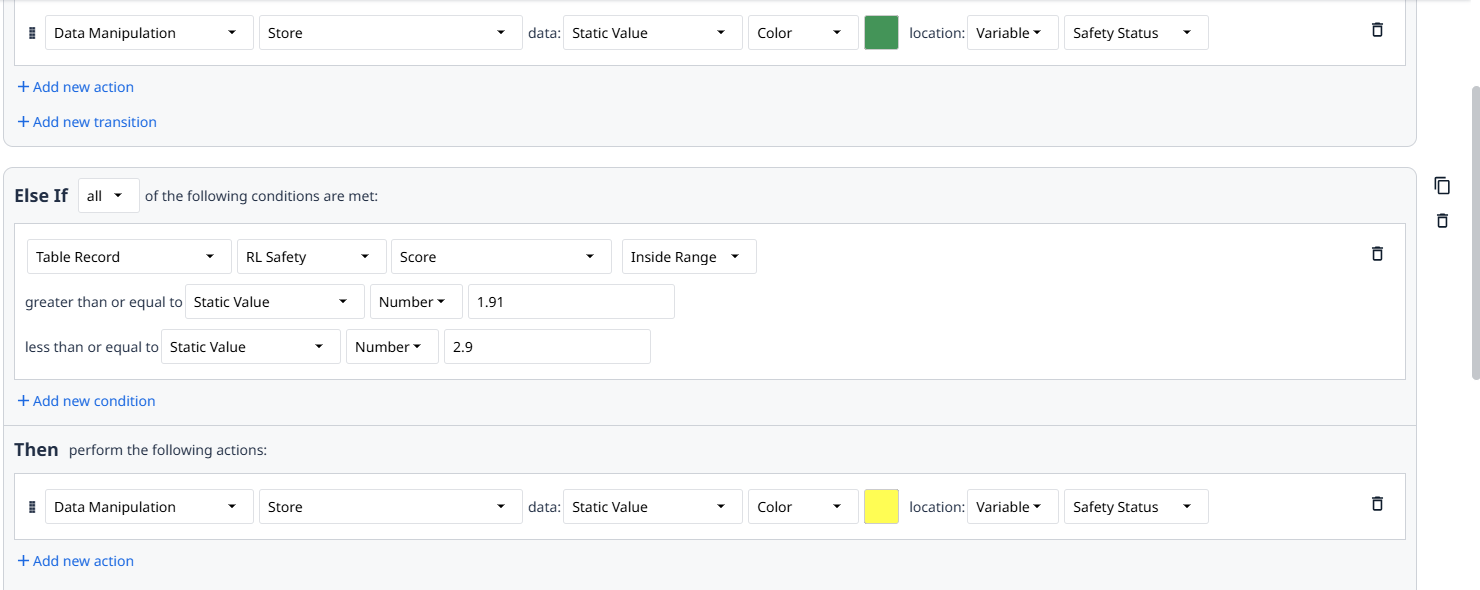
- So I input a table record into my app and set the background to a color variable. The trigger logic is broken down by values in the table record.
- Depending on the table record value, it should store green, yellow, or red in the color variable.
- The trigger is set for when the app is started.
- When I test the app in the player, no color change occurs.
Is inputting a table record specific enough, or do I need to do something else in order to see the desired color change?
Are you loading the RL Safety record before using it? Try adding some Show Message triggers to debug by simply printing out the current Score.