Hi,
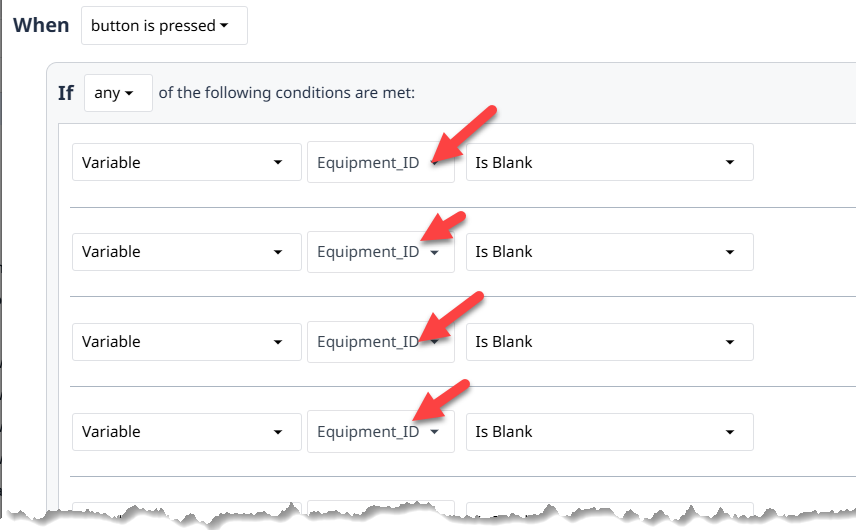
A huge pain for complex application is to be able to scroll trough of differents variable.
I would like to add a searchbar when using a variable.
Please check the attached screenshot.
Regards,
Clément.
The same problem occurs in the “Go To Step” dropdown menu. A search bar would also be helpful here.
Regards
But on the same time, the issue should be fixed, that you can not properly tab trough all the inputs with a search bar yet.
Looks like this feature was added but now it created a new annoyance for me but not sure if anyone else is impacted.
I have many Object variables with the same inner structure. Since the dropdown doesn’t shows the hierarchy of objects, I always need to click on the variable to see what object is being referenced.
Before this update I could click on the variable dropdown, and it would automatically jump to the already selected item in the list so I could quickly see what parent object is being referenced. Now it just shows the top of the list by default, and I need to scroll down to find the highlight item.
Ideally, I wouldn’t have to click on the drop down at all because the parent object name would just display for me on the trigger window but since that’s not the case it’s now even more tedious to verify the dropdowns selected and/or find a specific one that needs to be deleted or changed.
Maybe this only impacts me because of my setup, not sure?
Hey @doneil! Thanks for this feedback, this should be solved in r344. The searchable dropdown should automatically scroll to the correct position moving forward. Please keep the feedback coming!
I agree… however, you can hit the arrow down key after opening the dropdown, to jump to the variable.
Thanks.
Please also have a look on keyboard navigation.
After selecting a variable and confirming (with enter or space) the input looses focus and you can no longer use tabulator key to navigate.
I explicitly mentioned to keep an eye on that, because it was possible before!**
This is driving me nuts.
Additionally the copy action button does disappear, so you cant select it with the keyboard. It should simply stay there as the delete button does…
@thorsten.langner I am happy to say this should also be fixed in r344 as well!